How to Export a Gemini Conversation to Markdown
Gemini is the hardest major AI platform to get your data out of. There’s no export button on a conversation, and Google Takeout — the official route — delivers a flat activity log, not readable documents. If you want a Gemini chat as a Markdown file you can keep, edit, or file into your notes, the practical route is a browser extension that reads the live conversation and writes a clean .md file. This guide covers exactly that: one-click Markdown export for Gemini, what survives it, and where the files fit in a notes workflow.
Why Gemini needs a different approach
A quick tour of what Gemini offers natively:
- No per-chat export. Unlike ChatGPT, there’s no settings page that produces your conversations in any form.
- Google Takeout includes Gemini activity, but as a flat log of prompts and responses — not the formatted conversations, and not per-chat files.
- Copy-paste drops code fences, mangles tables, and loses the association between your question and the answer.
So the realistic options are: rebuild chats by hand, settle for the Takeout log, or read the conversation from the page with an extension and write it to Markdown properly.
Export Gemini to Markdown in three steps
Step 1 — Install the extension. Add the free XWX AI Chat Exporter from the Chrome Web Store. No account, nothing to configure.

Open the Gemini chat and choose Markdown
Step 2 — Open the conversation on gemini.google.com. The extension detects Gemini automatically.
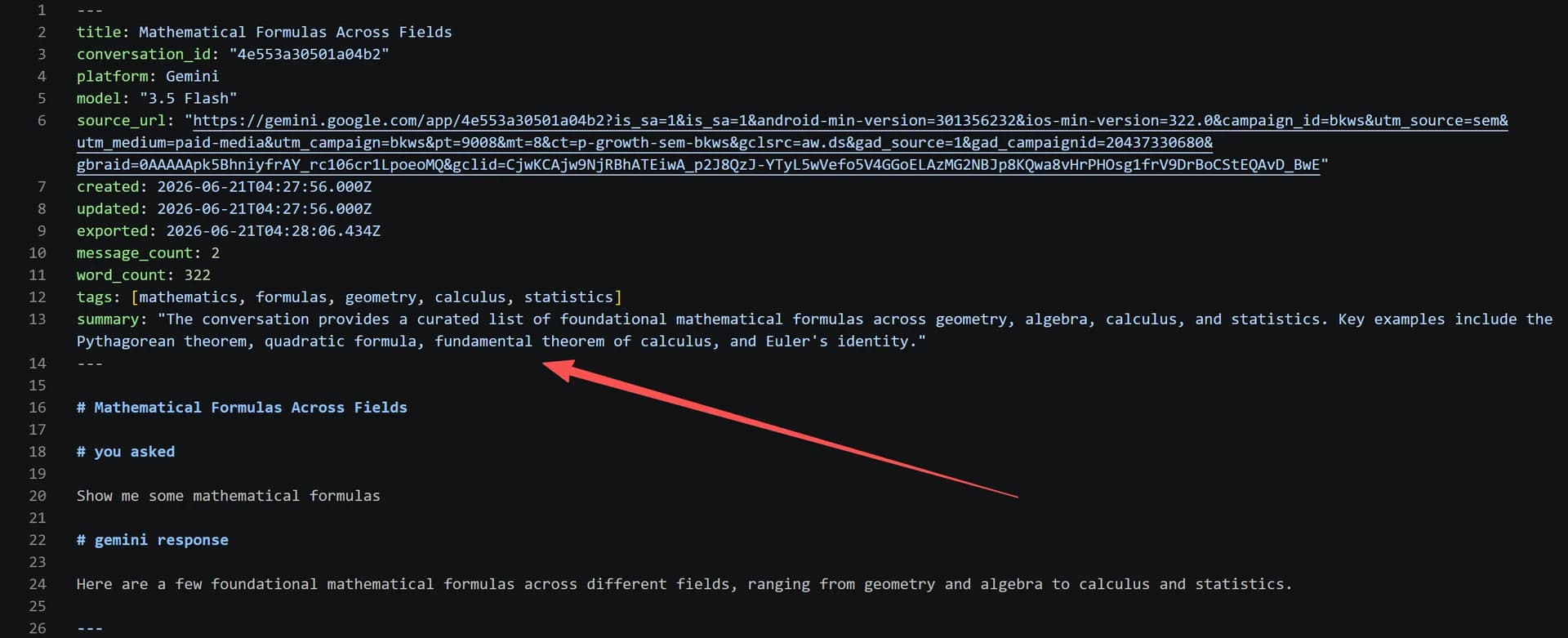
Step 3 — Click the floating button and choose Markdown. The .md file downloads with the conversation in order — code blocks fenced, tables intact, LaTeX preserved — plus YAML frontmatter with the model and timestamps. Markdown exports are free and unlimited.

Gemini-specific things worth knowing
- Deep Research reports export too — the reasoning steps and inline sources come along. See exporting Deep Research reports for the details.
- Images in answers are embedded into the Markdown so the file stays self-contained.
- Long conversations export fine, but refresh the page once before exporting so streaming responses are fully rendered.
- Gemini’s default history retention is time-limited on some account types — another reason a local Markdown copy is worth ten seconds of your time.
Where to put the files
- Obsidian — Gemini chats become queryable notes with frontmatter: export Gemini chats to Obsidian
- Notion — import the .md, or push Gemini chats to Notion without the intermediate file
- A local archive — the XWX Backup desktop app supports Gemini in batch and scheduled export, one .md per conversation
Frequently Asked Questions
Does Gemini have an export feature?+
Not per conversation. Google Takeout can include your Gemini activity, but as a flat log rather than readable per-chat documents. For a single conversation as a clean file, use a browser extension like XWX Exporter — open the chat, click the floating button, choose Markdown.
Is exporting Gemini to Markdown free?+
Yes. Markdown, TXT, JSON, and clipboard exports are free with no daily limits; PDF, Word, and Notion exports include a free daily quota.
Does the Markdown keep Gemini’s tables and code blocks?+
Yes — code blocks keep their fences and language tags, tables export as pipe tables, and LaTeX stays as LaTeX. Images from answers are embedded so the .md file is self-contained.
Can I export all my Gemini chats to Markdown at once?+
Yes, with the XWX Backup desktop app: pick Gemini, set a count or filter, and it batch-exports one Markdown file per conversation into a local folder. Scheduled export keeps new chats flowing in automatically.
Will Google Takeout give me readable Gemini chats?+
Not really — Takeout returns Gemini activity as a flat log of interactions, not formatted conversations. It’s fine as an account-level archive, but for chats you’ll actually reread, per-chat Markdown exports are the usable format.